

Echo Flow™ (Formerly H2® Server) User Manual
Product Manual
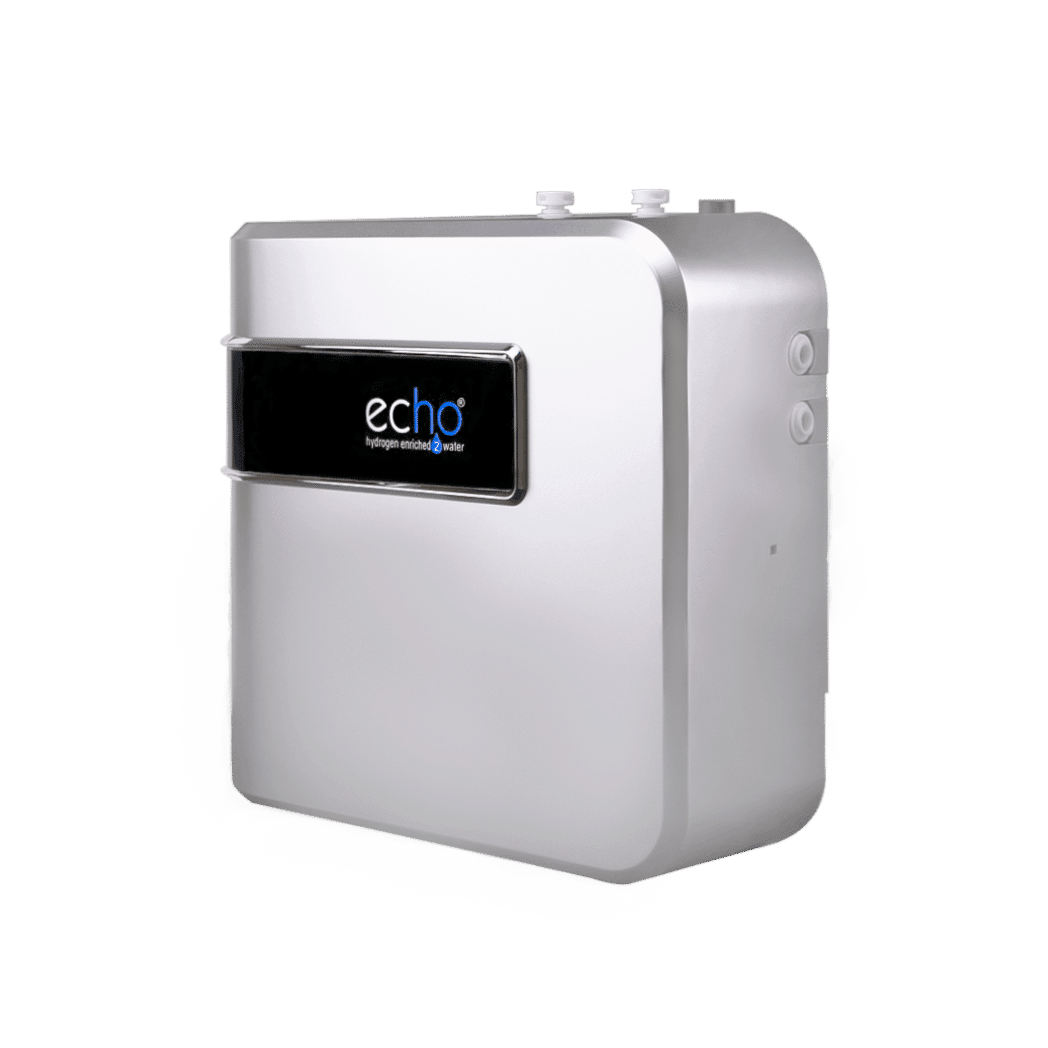
Meet the Echo Flow™
The Echo Flow® delivers powerful hydrogen-enriched water in a sleek, space-saving under-sink design. Producing up to 1.2 liters per minute, it supplies fresh hydrogen water on demand for the whole family.
Installed directly under your sink, the Echo Flow connects to your kitchen faucet, refrigerator line, or existing filtration system. Powered by the proprietary Echo Hydrogen Module™, it infuses clean water with up to 1.21 ppm of molecular hydrogen—without changing the water’s natural pH.
The result is clean, refreshing hydrogen-enriched water designed to support everyday hydration and wellness.
🔗 Features, Construction & Specifications
Important Usage & Safety Guidelines
Please review the following guidelines to ensure proper operation and long-term performance of your unit.
⚠️ Important Safety Notes
Follow these recommendations to help protect both the user and the device.
-
Do not disassemble or attempt to repair the unit yourself. This may cause damage to the product.
-
Avoid damaging or modifying the unit, as this can affect performance and may void the warranty.
-
This system is designed for residential and light commercial use only.
-
For optimal performance, avoid operating the unit continuously for more than 10 minutes at a time.
-
Use the appliance only for its intended purpose.
-
Install the unit in a cool, dry location. Avoid areas with excessive heat or humidity.
-
A surge protector is required to protect the system from electrical fluctuations.
-
Do not place objects on top of the machine.
⚠️ Care & Handling
To maintain the appearance and performance of your unit:
-
Clean the exterior with a soft damp cloth and water only.
Avoid using solvents such as thinners, benzene, or alcohol. -
Place the unit on a stable, flat surface during operation.
-
Do not move the machine while it is running.
Always turn off and unplug the unit before relocating it. -
If the unit will not be used for an extended period, unplug it from the power outlet.
|
|
|
What do the two white ports do on the Echo Flow (Formerly H2®) Server?
There are two white ports on the side of the Echo H2 Server, these are for decoration, you will not need to install anything here.
Echo Flow™ Installation Guide
Follow the steps below to properly connect your Echo H2® Server to your existing filtration or reverse osmosis system. .
A pre-filter must be installed before the Echo Flow, as it does not include built-in filtration.
Installation & Faucet Requirements
-
Secondary Faucet Required: The Echo RO/Server Faucet™ dispenses hydrogen water separately from your main faucet.
-
Countertop Hole: Requires a 15/16”–1” hole (often available from soap dispensers or accessories). Professional drilling is a low-cost option if needed.
-
Electrical Outlet: A dedicated outlet is required to ensure consistent power supply for the under-sink unit.
Before You Begin
-
Turn off the water supply to your filtration or RO system.
-
Confirm that all tubing used is 1/4 inch (0.635 cm) diameter.
Step 1: Connect the Incoming Water Line
Locate the tube that currently runs from your filter or RO system to your faucet.
-
Disconnect this tube from the faucet.
-
Insert this tube into the IN port on the Echo H2® Server.
This line now carries filtered water into the Server system.
Step 2: Connect the Outgoing Water Line
-
Take the new 1/4" tube included with the Echo H2® Server.
-
Insert one end into the OUT port on the Server.
-
Connect the other end to the faucet connection.
This line carries hydrogen-enriched water from the Server to your faucet.
Step 3: Restore Water Supply
Turn the water supply valve back on to your filtration or RO system.
Step 4: Connect Power
-
Insert the DC12V 8.3A power adapter into the power port on the Echo H2® Server.
-
Plug the adapter into a surge protector.
-
Confirm the green LED indicator on the power supply is illuminated.
Step 5: Test the System
Turn the faucet on and off several times to allow water to move through the system and ensure the Echo H2® Server is operating correctly.
Installation Video Disclaimer
The installation video may show an earlier version of the H2® Server. Some components have been updated in the newer model.
Updates include:
-
Pressure reducing valve now built internally
-
Plug port holders removed
-
Mineralizer discontinued
-
Added on/off power switch
-
Added hydrogen generator drain plug
These changes do not affect the basic installation process outlined above.
Purchased the Echo RO Machine?
Make sure to follow installation for the RO Machine in the 🔗Echo RO™ (Reverse Osmosis) User Manual
Echo Flow™ Operation Guide
How to Use Your Echo Flow™
1. Start Hydrogen Water Generation
-
Open the faucet valve.
-
The blue LED lamp on the top of the unit will turn on.
-
The hydrogen generator is activated, producing fresh hydrogen-enriched water.
Visual:
2. Stop Hydrogen Water Generation
-
Close the faucet valve.
-
The blue LED lamp will turn off.
-
The hydrogen generator stops, and hydrogen production ceases.
Visual:
Echo Flow™ Troubleshooting Guide
Please check the following before contacting Technical Support.
If the issue persists, call (855) 737-1114 or email: support@echowater.com
1. Pump Runs Continuously
Possible Causes:
-
Water supply blocked or purifier tank empty.
What to Do:
-
Ensure the water supply is turned on and flowing properly.
-
Disconnect the power supply, fill the tank if empty, then reconnect.
-
If the pump still runs continuously, submit a claim through our portal.
2. No Hydrogen Water After Continuous Use
Cause:
-
Machine has been running for more than 10 minutes continuously.
Solution:
-
Let the unit rest for 5 minutes before using again.
3. Low Water Output
Possible Causes:
-
Shut-off valves not fully open.
-
Power adapter not fully connected.
-
Bent or restricted hoses.
Solution:
-
Open all shut-off valves completely.
-
Ensure the power adapter is properly installed in the back of the machine and plugged in.
-
Straighten any bent hoses.
-
Replace or clean the filter if necessary.
-
If problem persists, upload a video via our claims portal for review.
4. Water Leaks
🔧General Leak:
-
Fittings or parts not securely connected.
-
Shut off water valve and unplug machine.
-
Open side panel and inspect connections.
-
Ensure all connects are secure.
-
Ensure the plug is intact.
-
If the internal plug looks warn, we can send a replacement plug at no extra charge
-
-
🔧Leak from Oxygen Outlet:
-
Incoming water pressure too high.
-
Install a reducing valve on the inlet.
-
Contact Technical Support if leak persists.
5. Strange Water Taste, Smell, or Appearance
Possible Causes:
-
Machine unused for a long period.
-
Calcium buildup or other residue.
Solution:
-
Run the machine for a few minutes to flush.
-
Replace or clean the filter if necessary.
6. Normal Sounds or Bubbles
-
Hydrogen generation may cause bubbles in the water — this is normal.
-
Unique operating sounds from the hydrogen generator are also normal.
7. Low Hydrogen Output
Check the Following:
-
Water supply valves fully open.
-
Water pressure is adequate.
-
Hoses are straight and not kinked.
-
The Filters prior to the Flow Machine is clean and free of calcium buildup.
Actions:
-
Replace or clean the filters of your pre-filtration if necessary.
When to Contact Support
If these troubleshooting steps do not resolve your issue, please submit a support request with:
-
A video of the issue
-
Photos of the front and back of the unit
Support Portal: https://returns.echowater.com/returns-portal/login
If a repair is needed and your unit was purchased from Echo Water or an authorized distributor, repair costs will follow our 10-year prorated warranty policy.
Warranty
🔗 Echo Ultimate Machine™ Warranty Coverage - limitations, registration, where to file a claim
🛡️ If you bought directly on Echowater.com or Echowater.co.uk, you do not need to register your product as you are already in our system.
Return Policy
- Purchased from Echowater.com: 🔗 Return Portal
- Purchased from Echowater.co.uk: 🔗 UK Return Portal
- 3rd Party Returns: Returns must be handled through the retailer where you made your purchase. Their return policies and timelines will apply, so we recommend contacting them directly for assistance.
❔Common Customer Questions
🔗 How long to feel the benefits of Hydrogen Water?
🔗 Why am I experiencing unexpected symptoms after starting Hydrogen Water?
🔗 What sets your Flask apart from Others?
🔗 Why is the Echo Flask made of plastic?
Echo Water Support
Need Help? We’ve Got You Covered
If you have a question, need assistance, or something doesn’t seem quite right, our team is here to help between 9 AM and 5 PM MST, Monday through Friday..
🔗 Echo Water Support: You've got Questions, We've Got Answers!
Hydrogen Water Overview
-
🔗 Hydrogen Water Storage | How to Store, how long does hydrogen last after a cycle, can it be put in a different container other than my Flask
-
🔗 Guidelines for Using Hydrogen Water with Cold Water, Heat, and Additives